Whether you are strolling through the city, exploring by bicycle, or transferring between buses during a trip, “Journey GPS Tracker” helps you save your entire route, so every outing can be traced and reviewed.
One-Tap Location: Quickly Return to Your Current Location
After opening the map, simply tap the  icon button below to quickly focus on current location. Whether you are moving through an unfamiliar city or walking outdoors, you can always confirm where you are.
The upper-right corner of the map also shows your current heading direction with a blue arrow, helping you judge your direction of travel more intuitively and reduce wrong turns or unnecessary detours.
Multiple Route Planning Options, Freely Choose How You Travel
On the Places page, tap the distance number next to a place to display the route from your current origin to the target place on the Map page.
You can choose according to your actual needs:
- Walking route
- Driving route
- Bicycle route
- Public Transportation route
Public Transportation routes are shown as colored solid lines, making it easy to distinguish different transit segments; Walking, Driving, and Bicycle routes are shown as dashed lines, keeping the map information clearer.
If you want to view more detailed route information, simply tap the  icon below to open or close the route details, including travel time, distance, bus stops, route information, and more, making your travel planning more relaxed.
Record Tracks in Real Time and Understand Speed Changes by Color
Tap “Start recording” below, and the app will begin recording your travel track.
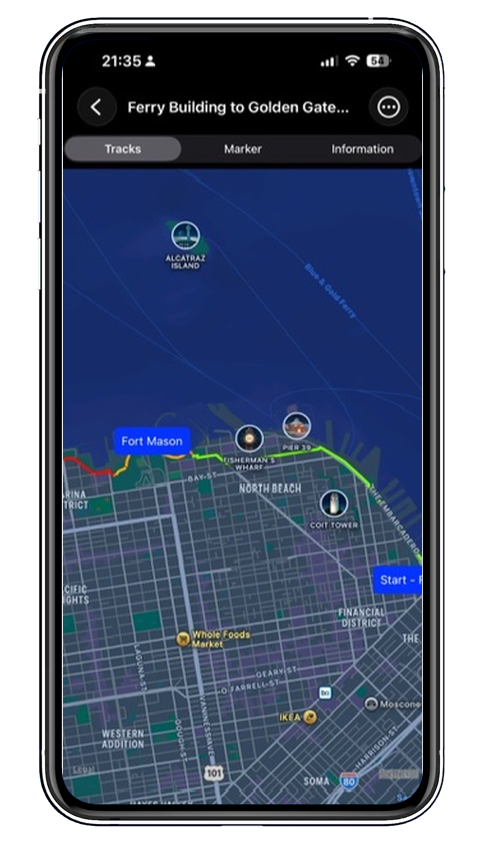
The track is displayed in a red-yellow-green gradient according to different speeds:
- Green: slower speed, usually suitable as a reference for a Walking track
- Yellow: about 18 km/h, suitable for indicating Cycling speed
- Red: faster speed, suitable as a reference for tracks made while taking transportation
Through these color changes, you can not only see where you have been, but also intuitively understand your movement status on different sections. A trip, a ride, or a commute can all be clearly recorded.
Use History Tracks as References to Give Your Next Trip More Direction
You can also choose tracks you recorded previously and display them on the map as references. History tracks are shown as dashed lines, so they do not interfere with the current route while still helping you compare them with paths you have taken before.
Whether you want to revisit a favorite route or compare the differences between paths taken with different travel methods, it is very convenient.
A Travel Recording Tool for Many Scenarios
“Journey GPS Tracker” is suitable for:
- Recording your daily itinerary while traveling
- Saving exercise routes when Walking or Cycling
- Marking neighborhoods you have explored in the city
- Comparing different routes during your commute
- Reviewing travel routes and modes of movement
It is not only a map tool, but also more like your personal travel journal, organizing location, direction, routes, speed, and tracks on a single map.
Let the Map Record Your Story
Every departure is more than just moving from one place to another. The route along the way, the changes in speed, and the streets you have passed are all part of the journey.
Use “Journey GPS Tracker” to clearly record every step, every ride, and every part of your journey, ready for review at any time. Your next departure starts with a map that understands you better.
Comments
Comments are reviewed before they appear below the article.
No comments yet. Be the first to comment.